
Shopify vs WooCommerce in India (2026): Which Should You Choose?
Shopify vs WooCommerce for Indian stores: cost, UPI and COD, GST, speed, SEO and when a custom store is the smarter third option.

Table of contents
- Shopify vs WooCommerce: the short answer
- What Shopify and WooCommerce actually are
- Cost: what you pay in the first year
- Shopify costs
- WooCommerce costs
- Payments in India: UPI, cards and COD
- GST, invoices and shipping
- Shopify vs WooCommerce: speed and mobile performance
- Shopify vs WooCommerce for SEO: which ranks better?
- Shopify vs WooCommerce: ease of use and maintenance
- Design and themes
- Growing from 50 to 5,000 products
- Support when something breaks
- The third option: a custom store
- Which one should you choose? Three real situations
- A new clothing brand selling on Instagram
- A coaching institute that already has a WordPress site
- A Delhi wholesaler selling to shops
- Can you switch later?
- What we usually recommend
- Common mistakes when choosing
- A five-question checklist
- Frequently asked questions
- Is Shopify or WooCommerce cheaper in India?
- Which is better for SEO, Shopify or WooCommerce?
- Does Shopify support cash on delivery in India?
- Can I use Razorpay with both?
- Should I sell on Amazon or Flipkart instead?
- Can CodeXprime help me decide?
- Get help choosing your platform
Shopify vs WooCommerce in India comes down to one trade-off: Shopify is faster to launch and easier to run, while WooCommerce gives you more control and no monthly platform fee, but needs more upkeep. For most small Indian stores with under 100 products, Shopify is the simpler start. If you already run a WordPress site, WooCommerce fits better. And if you need B2B pricing, custom features or want to avoid platform fees altogether, a custom store is worth looking at too.
We build online stores for Indian businesses at CodeXprime, so we see this question every week. This guide compares both platforms on the things that matter in India: cost, payments, COD, GST, shipping, speed and SEO. It also covers the third option most comparisons skip.
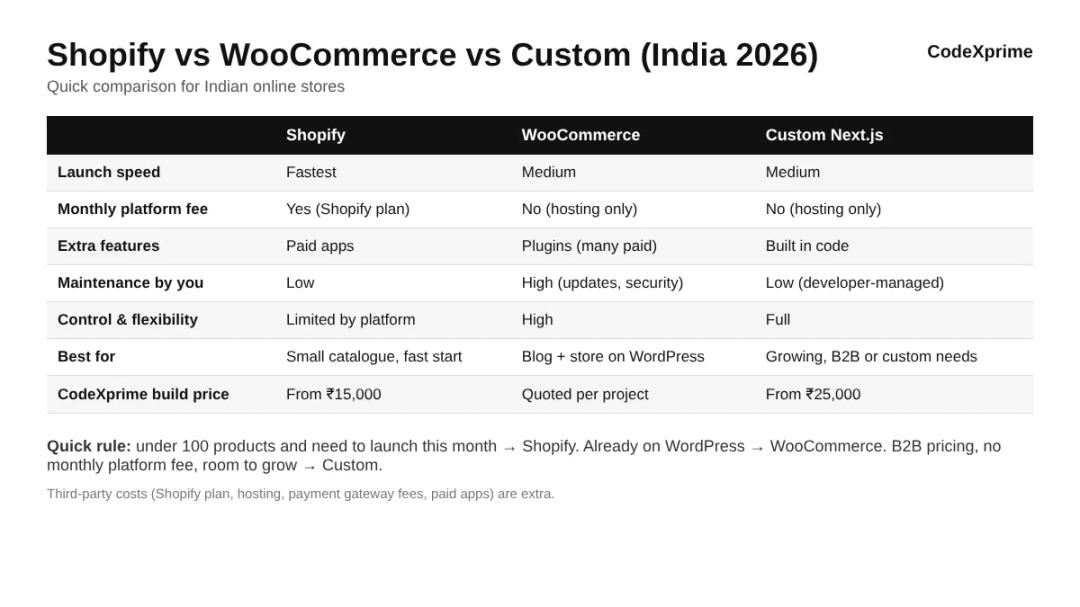
Shopify vs WooCommerce: the short answer
If you… | Pick |
|---|---|
Want to launch this month with a small catalogue | Shopify |
Don't want to deal with hosting, updates or security | Shopify |
Already have a WordPress website with a blog | WooCommerce |
Want full control and are comfortable with plugins | WooCommerce |
Sell B2B, need special pricing rules or want no platform fee | Custom store |
What Shopify and WooCommerce actually are
Shopify is a hosted platform. You pay a monthly plan, and Shopify takes care of servers, security and updates. You add features with apps from the Shopify App Store. You can't change the core system, but you rarely need to.
WooCommerce is a free plugin that turns a WordPress website into a store. The software costs nothing, but you need your own hosting, a theme and usually a few paid plugins. You own everything, and you also look after everything.
That difference, rented and managed vs owned and self-managed, explains almost every point below.
Cost: what you pay in the first year
Neither platform is free in practice. The costs just sit in different places.
Shopify costs
A monthly or yearly Shopify plan. Check current plans on Shopify India pricing.
Paid apps for reviews, GST invoices, WhatsApp, filters and similar features.
A paid theme, if you don't want a free one.
Payment gateway fees on each online payment.
WooCommerce costs
Hosting. Cheap shared hosting often slows down once orders grow, so plan for decent hosting.
A theme and paid plugins, many with yearly renewals.
Security, backups and updates, either your time or a developer's.
Payment gateway fees on each online payment.
For a small store, Shopify usually costs more per month but less in time and surprises. WooCommerce looks cheaper at first, but plugin renewals and maintenance add up. Our full breakdown of build and running costs is in Ecommerce Website Cost in India (2026).

Payments in India: UPI, cards and COD
Both platforms work with Indian payment gateways such as Razorpay, so customers can pay by UPI, cards, netbanking and wallets. Both also support cash on delivery.
The difference is in the details. On Shopify, COD rules like limiting it to certain pincodes or order values usually need an app. On WooCommerce, the same comes from a plugin or custom code. If COD returns are a big problem in your category, plan these rules before launch, whichever platform you choose. Gateway fees are charged per transaction; check the latest on Razorpay's pricing page.
GST, invoices and shipping
Indian sellers usually need GST-ready invoices with their GSTIN, and a courier setup for pickups and tracking.
GST invoices: both platforms need an app or plugin for proper Indian GST invoices. Set tax rates per product category.
Shipping: Shiprocket and similar aggregators connect to both, creating pickups and tracking links automatically.
Pincode checks: showing "delivery available" by pincode needs an app on Shopify and a plugin on WooCommerce.
For GST registration questions, speak to your CA or check the official GST portal.
Shopify vs WooCommerce: speed and mobile performance
Most Indian shoppers browse on phones, often on mobile data. A slow store loses buyers before the product page even loads.
Shopify stores are usually fast out of the box because the hosting is managed. They slow down when too many apps are installed, since each app adds scripts. WooCommerce speed depends almost entirely on your hosting and how many plugins you use. A WooCommerce store on good hosting with a light theme can be fast. On cheap hosting with twenty plugins, it often isn't.
A simple test: open your store on a mid-range phone using mobile data, not office Wi-Fi. If the home page takes more than three seconds, fix it before spending on ads.
Shopify vs WooCommerce for SEO: which ranks better?
Neither platform ranks your store by itself. Google ranks pages, not platforms. What matters is content, page speed, structure and links.
Shopify handles basics well: sitemaps, clean product URLs and editable titles. Some URL patterns are fixed, such as /products/ and /collections/.
WooCommerce gives more control through WordPress and SEO plugins, and WordPress is strong for blogging, which helps you rank for informational searches.
If content marketing is central to your plan, WooCommerce or a custom store with a proper blog has a slight edge. If you mainly sell through Instagram and ads, the difference matters less.
Shopify vs WooCommerce: ease of use and maintenance
This is where Shopify wins clearly for most owners. Adding products, processing orders and running discounts is simple, and you never worry about updates or server problems.
WooCommerce needs regular care: WordPress core updates, plugin updates, backups and security checks. Skip these and you risk a broken or hacked store. If you don't have a developer on call, factor this in.
Design and themes
Both platforms have hundreds of themes. Shopify themes are reviewed by Shopify, so quality is fairly consistent, and most look good on mobile. WooCommerce works with thousands of WordPress themes, but quality varies a lot. Some are fast and well built; others are heavy and full of features you will never use.
Whichever you pick, a theme is only a starting point. Your product photos, clear prices, delivery information near the Add to Cart button and a short checkout make a bigger difference to sales than the theme name.
Growing from 50 to 5,000 products
Shopify handles growth smoothly on the technical side. Your costs grow as you move to higher plans and add apps, but the store itself stays stable. WooCommerce can also grow, but it needs better hosting, database care and caching as orders increase. Stores that start on cheap hosting often hit slowdowns during sales or festive peaks.
If you expect fast growth, high order volume or a large catalogue, plan for it from day one. This is also the point where many brands move to a custom store, because they want speed and features without paying for more and more apps.
Support when something breaks
Shopify has its own support team, available round the clock, for platform issues. App problems go to the app developer. WooCommerce has no single support desk; you rely on your host, plugin makers and your developer. For a busy owner, the question is simple: who will you call at 9 pm on a sale day when checkout stops working? Have that answer ready before you launch.
The third option: a custom store
Most Shopify vs WooCommerce comparisons stop at two choices. For many Indian businesses, there is a third: a store built in code for your business, for example on Next.js.
A custom store has no monthly platform fee and no app limits. Features like wholesale prices, minimum order quantities, subscriptions or a special checkout are built exactly as you need them. Pages are usually very fast. The trade-off is a higher build cost than a basic Shopify setup, and you need a developer you trust for changes.
This is what we build for most clients at CodeXprime. One example is the Genuine Nutrition supplement store, built on Next.js, Node.js and PostgreSQL with Razorpay payments and Shiprocket shipping. A custom Next.js store at CodeXprime starts at ₹25,000; a Shopify store starts at ₹15,000. See ecommerce website development or custom website development for details.
Which one should you choose? Three real situations
A new clothing brand selling on Instagram
About 60 products, sizes and colours, wants to launch before a festive season. Shopify. It is quick to set up, looks good on mobile and handles variants well. Move to custom later if the brand grows into B2B or needs features Shopify charges a lot for.
A coaching institute that already has a WordPress site
Wants to sell study material and a few courses alongside its blog. WooCommerce. It adds a store to the existing site without starting over, and keeps the blog that already brings visitors.
A Delhi wholesaler selling to shops
500+ products, login-only prices, bulk discounts and repeat orders. Custom store. Doing this on Shopify needs several paid apps and still feels like a workaround. A custom build fits how they sell. If you are in Delhi, see our ecommerce website development company in Delhi page.
Can you switch later?
Yes. Products, customers and orders can be moved between Shopify, WooCommerce and custom stores. The tricky parts are keeping URLs and setting up redirects so you don't lose Google rankings, and moving customer passwords, which usually means customers reset them once. Plan the move with your developer and do it in a quieter sales month. Our website redesign page explains how we handle migrations without losing traffic.
What we usually recommend
For first-time sellers, we often suggest starting on Shopify, keeping apps to a minimum, and spending the saved money on good product photos. For businesses that already sell well offline or to other businesses, a custom store tends to pay back faster. We say this openly on every call, because the wrong platform costs you more than our fee ever will.
Common mistakes when choosing
Picking WooCommerce to save the monthly fee, then paying more in plugins and fixes
Installing fifteen Shopify apps in the first week and slowing the store down
Choosing a platform before listing the features you actually need
Ignoring COD and return rules until fake orders start costing money
Keeping the store, domain or hosting in a developer's account instead of your own
A five-question checklist
How many products will you have in the next 12 months?
Do you already have a WordPress website you want to keep?
Do you need B2B pricing, subscriptions or custom checkout rules?
Who will handle updates, backups and fixes?
Are you more comfortable with a monthly fee or a one-time build cost?
Once you have picked a platform, follow our guide on how to create an ecommerce website in India for the remaining steps. Your answers usually point clearly to one platform. If they don't, a short call with a developer helps.
Frequently asked questions
Is Shopify or WooCommerce cheaper in India?
WooCommerce has no platform fee, but hosting, plugins and maintenance add up. Shopify has a monthly plan but fewer surprises. For a small store, the first-year totals are often closer than people expect.
Which is better for SEO, Shopify or WooCommerce?
Both can rank well. WooCommerce gives more control and stronger blogging through WordPress, while Shopify covers the basics with less effort. Content and speed matter more than the platform.
Does Shopify support cash on delivery in India?
Yes. COD can be enabled, and apps can limit it by pincode or order value.
Can I use Razorpay with both?
Yes. Razorpay works with Shopify, WooCommerce and custom stores.
Should I sell on Amazon or Flipkart instead?
Marketplaces bring ready buyers but take a commission on every order and keep the customer relationship. Many brands use both: marketplaces for reach and their own Shopify, WooCommerce or custom store for better margins and repeat customers.
Can CodeXprime help me decide?
Yes. Send us your product count and what you need, and we'll recommend the platform that fits, even if it is the cheaper one.
Get help choosing your platform
Still unsure? Message us on WhatsApp with what you sell and how many products you have. We'll reply with an honest recommendation and a written quote. You can also read about our Shopify development service or see all prices on the website development cost page.
Written by Ritesh Kumar, founder and full-stack developer at CodeXprime. Ritesh builds online stores and payment platforms for Indian businesses, including Genuine Nutrition and Monark FX.